
PingCab
local_taxi

Taxi firm? Register here in 10 minutes — first 3 months free

arrow_forward

FOUNDING FIRMS: 3 MONTHS FREE

Run your whole firm
from one screen.

The dispatch office, the drivers, the cars, the numbers — and a booking app that brings you new passengers. PingCab is the one screen your whole firm runs from, in any browser, with nothing to install.

Drive for a firm? Ask them for a PingCab invite — drivers join through their firm.

firm.ping-cab.com
The PingCab firm portal: the dispatch console with a phone booking form, nearest free cars, the live fleet map and the job queue

Your dispatch office: take the call, see your nearest free car, send the job — all on one screen.

Everything your firm runs on, in one place

One sign-in. Any browser. Nothing to install.

Your dispatch office

Take the call, send the job, watch it happen

The console is the home screen: a phone-first booking form on the left, your nearest free cars and the live map beside it, and every job your firm is running underneath.

  • check_circleASAP or pre-booked, up to two via stops, and instructions for the driver
  • check_circleAgreed price or on the meter — the tariff estimate shows as you type the addresses
  • check_circleNearest free cars with their distance from the pickup: hold the job, or save and send it to the nearest free car
  • check_circleA live job queue with Dispatch, Pre-booked, Completed, Cancelled and No-show tabs, counters, and 1H / 24H / 7D / 28D figures — open any job to send it to a driver or cancel it
  • check_circleA live fleet map you can enlarge to fill the screen

keyboardBuilt for the keyboard. F2 starts a booking, Ctrl+Enter sends it, Alt+H holds it — the shortcuts are printed on the buttons until you know them.

helpNew to it? Every page has a “How does this work?” walkthrough that points at each part of the screen and explains it.

firm.ping-cab.com
Close-up of the dispatch console: the phone booking form with ASAP or Later, pickup, via and destination, the Hold and Save booking buttons with their keyboard shortcuts, the nearest free cars with distances, and the agreed price or on the meter choice with a tariff estimate

The booking form, your nearest free cars and the price — the left half of the console, up close.

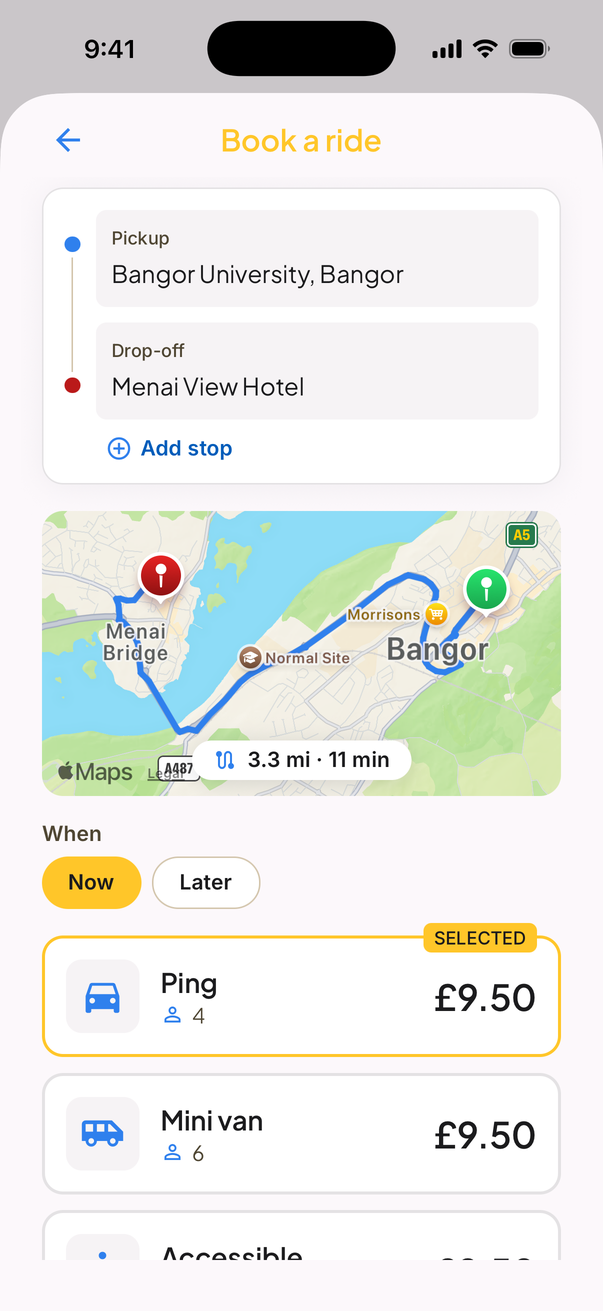
The PingCab passenger app: booking a ride from Bangor University to Menai Bridge, choosing between a saloon and a minivan with the fare shown up front
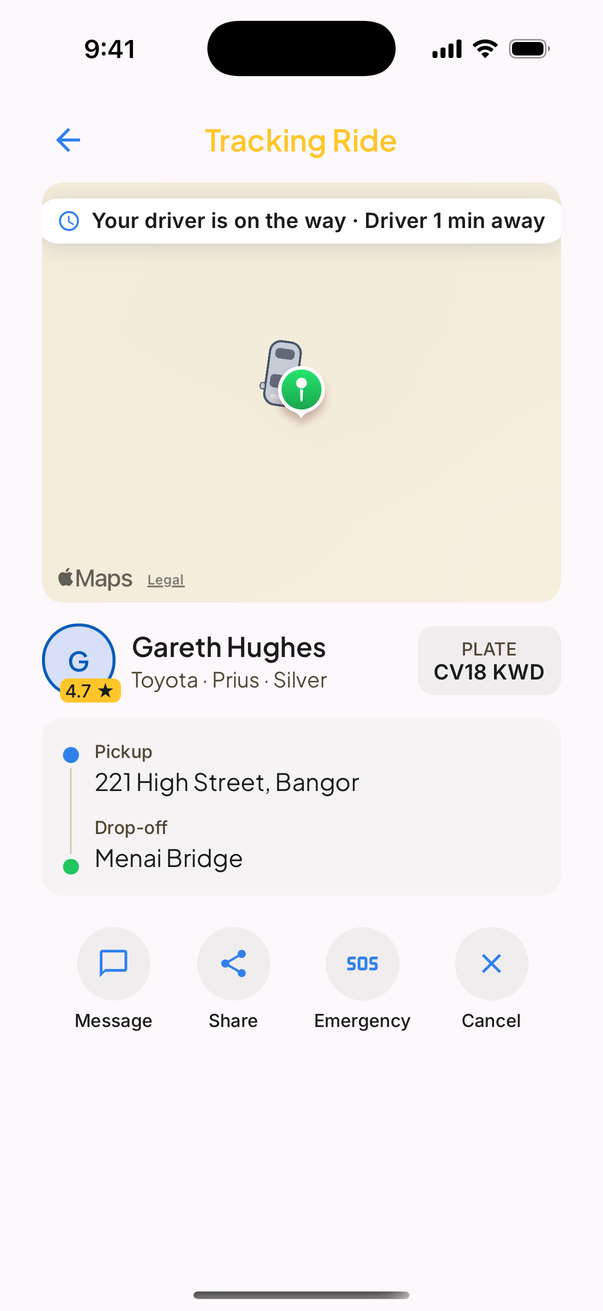
The PingCab passenger app tracking a ride: the driver is on the way, with the driver's name, rating, car and number plate shown

The booking app

Bookings from the app, without giving away your fares

Passengers book in the PingCab app and pay by card in the app. They see your firm's name and logo, the driver, their badge, the car and the plate, and watch the driver arrive. Jobs are offered to your drivers nearest the pickup first.

  • check_circleCard fares are paid out to your firm's own bank account through Stripe
  • check_circleApp jobs land in the same queue, the same map and the same figures as your phone jobs
  • check_circleYour drivers take the jobs in PingCab Pro, included with your subscription

App jobs: your firm keeps 100% of the fare

PingCab's income is the booking fee the passenger pays on top — 6%, between £1 and £2.50, never more than 20% of the fare — plus your subscription.

Phone jobs: no PingCab fee at all

Jobs you take yourself are priced as agreed or on the meter, and payment stays between you and your customer.

Drivers, cars and compliance

Your people and your fleet, kept in order

Licences, badges, insurance, MOTs and plates all in one place, with expiry dates — organised before the council asks.

firm.ping-cab.com/drivers
The Add a driver form in the portal: the driver's badge number and expiry date, issuing council, and upload slots for the driving licence front and back and the hackney carriage driver badge

Drivers & documents

Send an invite link, or add the driver yourself — name, mobile, licence, badge, scans and vehicle — so they simply sign in on that mobile. You review the documents, with expiry dates, and approve them. Each driver's page shows their rating, acceptance, hours online and earnings.

firm.ping-cab.com/vehicles
The Certificates card for a vehicle in the portal: hire and reward insurance, MOT certificate and hackney vehicle licence plate, each with an expiry date and an Upload button, with a note that the firm is warned 30 days before anything lapses

Vehicles

Make, model, colour and year from dropdowns, class and seats, then the insurance, MOT and plate certificates with their expiry dates — you're warned before anything lapses. Add a photo of the actual car, too.

firm.ping-cab.com/drivers
The Your drivers list in the portal: each driver with an online indicator, the number plate of the car they are assigned to, their status badge and a link to their profile

Shifts & mileage

Every shift on record: which driver, in which car, with the odometer reading at clock-on and at clock-off — a shift and mileage log per driver and per vehicle. Drivers clock on in PingCab Pro from the next app update.

Bookings & insights

The numbers, when you want them

Pick any period — the last hour, 24 hours, 7, 28 or 90 days, or your own dates — and see what your firm actually did.

  • check_circleJobs, completed, cancelled and no-shows; completion rate, average time to allocate, average fare
  • check_circleTakings in the app against your own jobs
  • check_circleJobs over time, your busiest hours, top drivers and top pickup areas
  • check_circleA searchable table of every job, and CSV export for your accountant
firm.ping-cab.com/bookings
The Bookings page in the portal for the last 28 days, with sample data: tiles for total jobs, completed, completion rate, cancelled, no-shows, no car available, average time to allocate, average fare and takings in app versus own jobs; a jobs-per-day bar chart; where jobs come from; a busiest-hours heatmap; top drivers; and top pickup areas

Bookings & insights over 28 days. The figures shown are sample data, not a real firm's.

Also in the portal

  • mapA full-screen live map of every online driver and every live job
  • speedA performance page: fare accuracy, acceptance and time to accept
  • support_agentPassenger support tickets — lost property, complaints — answered from the portal
  • campaignA marketing kit to tell your customers you're on the app
  • settingsSettings for your depot, licensing, safeguarding contact, lost-property note and logo
  • translateThe passenger app and driver app in Welsh and English

Pricing

No commission. Ever.

Ride-hailing giants take 15–25% of every fare. PingCab charges a flat monthly subscription per driver — your firm keeps 100% of every fare. Riders pay our small booking fee on top, so it never comes out of your pocket.

3 MONTHS FREE

One price. Every firm.

£5/driver/mo

£0 to start

then £5/driver/mo

  • checkEverything included
  • checkPortal + PingCab Pro for every driver
  • checkNo commission — your firm keeps 100% of every fare
  • checkCancel any time
Start free — 3 months

App fares are paid into your firm’s own Stripe account. It is your account, so you decide how often the money moves to your bank — daily, weekly or whenever suits you.

Founding firm offer — your first 3 months free

Join during our North Wales launch and pay nothing while the bookings build up. Card processing (roughly 1.5% + 20p per ride) is the only per-ride cost, and we split it with you 50/50.

What a £10 app fare actually pays

RIDE-HAILING GIANT

Passenger pays£10.00
Commission (up to 25%)−£2.50
Left for the driver & firm£7.50

PINGCAB

Passenger pays (fare + £1 fee)£11.00
Connection fee → PingCab−£1.00
Your half of card processing−£0.19
Paid to your firm£9.81

The booking fee is paid by the rider on top of your fare — it never comes out of the fare itself. Your own phone jobs carry no fee at all.

Questions firms ask us

Do you take a cut of my fares?expand_more

No. Your fare is paid to your firm in full. Our revenue is the rider-paid booking fee (6%, £1–£2.50, never more than 20% of the fare) and your per-driver subscription. The only per-ride cost to you is half of the card processing (~19p on a £10 fare).

Can I take phone bookings?expand_more

Yes — that's what the dispatch console is for. Type the job in as the caller talks, ASAP or pre-booked, agreed price or on the meter, and send it to your nearest free car. Phone jobs sit in the same queue, on the same map and in the same figures as app jobs.

Do you take a cut of my phone jobs?expand_more

No. There's no PingCab fee on jobs you take yourself. The fare is whatever you agree or the meter says, and payment stays between your firm and your customer. You pay only the per-driver subscription.

Who decides which jobs my drivers take?expand_more

Your firm does. App jobs are offered to your online drivers nearest the pickup first, and the driver accepts in one tap. Phone jobs you send to a driver yourself from the console. PingCab never auto-assigns work to your firm — accepting is always your choice.

How do my drivers join?expand_more

Two ways. Send an invite link and the driver fills in their own details in PingCab Pro — or add them yourself in the portal with their name, mobile, licence, badge, scans and vehicle, so they just sign in on that mobile. Either way you review the documents and approve them. Individual drivers can't join PingCab without a firm.

How do passengers pay?expand_more

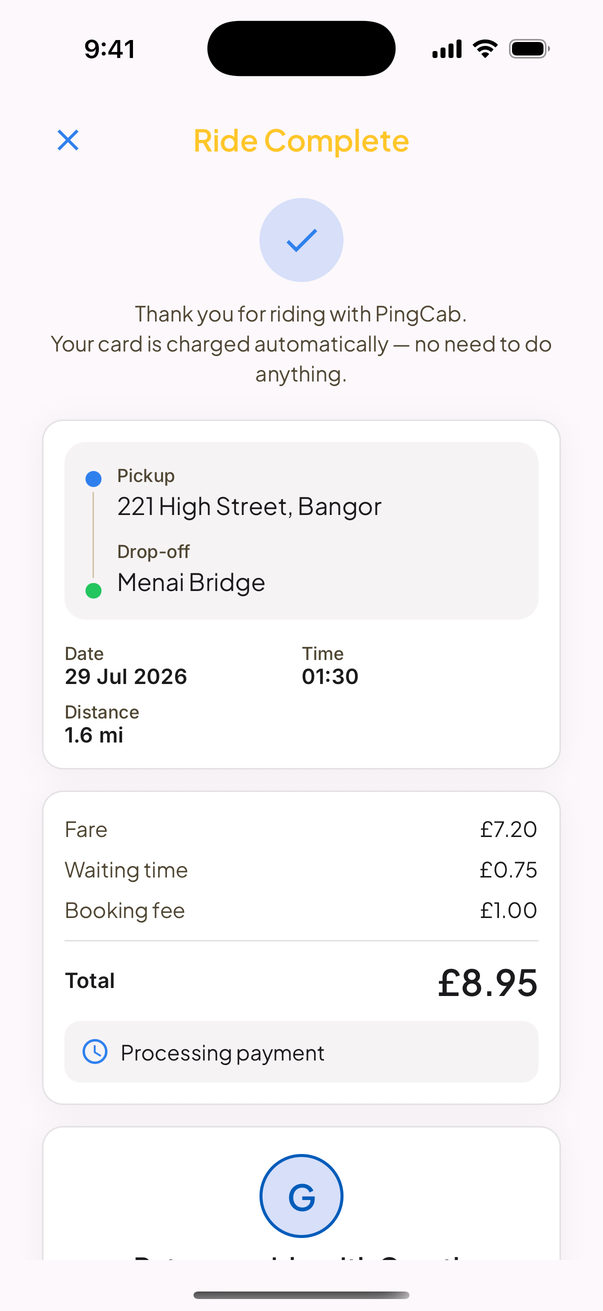
App bookings are paid by card in the app (including Google Pay). The card is charged automatically when the ride completes and Stripe pays the fare out to your firm's bank account. Your drivers never handle payment for app jobs. Phone jobs are paid as they are today — that's between you and your customer.

Do I need new licences?expand_more

No — PingCab is booking software for firms that are already licensed. It only takes hackney carriage work, so jobs run under the licences you already hold: your cars' hackney plates and your drivers' badges. The portal keeps your drivers' and vehicles' documents organised, with expiry dates, for the council.

Do I need to install anything?expand_more

No. The portal runs in any web browser on the laptop or PC you already have, and your drivers use PingCab Pro on their own smartphone. There's no hardware to buy and nothing to install — most firms are live the same week.

Is it in Welsh?expand_more

Yes. The passenger app and the driver app are in Welsh and English, so your customers and your drivers can use whichever they prefer — and so is this website.

Coming next

What we're building now

Not live yet — listed here so you know what's on the way. Founding firms get a real say in what comes after.

  • system_updateIn the next app update: passengers get a “who's coming” card with a photo of the actual car, and drivers clock on to a shift in PingCab Pro with the odometer reading.
  • receipt_longBusiness accounts and invoicing for your account customers.
  • layersZones with driver queues for the ranks and areas you work.
  • phone_in_talkCaller-ID pop-up on the console when the phone rings.

Be a founding PingCab firm

Three months free, priority onboarding, and a real say in what we build next. Register in ten minutes — we'll walk you through the rest.

Drive for a firm? Ask them for a PingCab invite.